
紙芝居アプリ 4.0 内部仕様書
Copyright © 2026 Hiroya Kubo. この文書はCC BY-SA 4.0で提供します。
文書状態: 固定実装基準を説明する内部仕様(正式リリース済みの意味ではない)
調査基準: TM Kamishibai 29c0dea(4.0.0-rc.8)、2026年8月20日
配布状態との区別: 2026年8月20日時点で
v4.0.0-rc.8はprereleaseとして公開されていますが、 正式なv4.0.0ではありません。本書はrc.8固定コミットの内部構造を説明します。
この文書は、TM紙芝居4.0のsource frontend、実行中間表現、runtime、platform adapter、 preview transactionの責務境界を、完成実装に対応させて記録します。作者向けのYAML構文は 紙芝居DSL 4.0 台本作成ガイド、fieldの型と制約は 紙芝居DSL 4.0 Schemaリファレンスを参照してください。
対象アプリ: TM Kamishibai 4.0.x
受理するDSL宣言: kamishibai: '4.0'
実装固定commit: 29c0dea(2026年8月20日、v4.0.0-rc.8)
本書のpath、型、関数、event、flagは、このcommitのsourceとtestを基準にしています。 配布成果物を調査して推測した名称ではありません。
読む前に
本書は、4.0の利用方法を知った後に内部の層を理解する開発者向け文書です。アプリの使い方や台本作成の 入門書ではありません。初めて4.0に触れる場合は大人向け概要、 制作環境から実装へ進む場合はアプリ・教材・ツールチェインガイドを 先にお読みください。実際の保守手順だけを探している場合は ソフトウェアメンテナンスガイドから入り、必要な内部節へ戻る方法もあります。
本書は「範囲 → 用語 → アーキテクチャ → 各層 → transaction → 診断」の順で読みます。特に
StoryDocument、generation、port、adapter、commitの意味を用語表で確認してから先へ進んでください。
文書の範囲
本書は次を扱います。
- project内のYAMLを有限かつ決定的に読み取るsource frontend
- 複数sourceを一つのgenerationへ構成するSource Graph
- JSON Schema検証、意味検証、式検証と診断の順序
- immutableな
StoryDocumentとsource位置の対応 - sceneとactionを実行するruntime controller、Action Context、navigation
- TurboWarp、asset、入力、pose、SVG Textを隔離するplatform adapter
- assetのprepare、scene commit、releaseとlive reload transaction
- browser preview、CLI preview、production SB3の共有契約と能力差
本書はYAMLの書き方、作品制作手順、release作業そのものは扱いません。また、Scratch target、
保存block、broadcastを内部仕様の中心には置きません。4.0の正本はYAMLから生成する
StoryDocumentと、それを消費するJavaScript moduleの契約です。
用語
| 用語 | 本書での意味 |
|---|---|
| project | project.source.json、entry YAML、included YAML、local assetを含むdirectory境界 |
| source | .k4.yml、.k4.yaml、.kamishibai.yml、.kamishibai.yamlのいずれかで終わるYAML |
| Source Graph | entryからincludeで到達するsource、edge、宣言、asset pathを持つimmutable graph |
| generation | sourceとassetを同じ時点の検証済みsnapshotとして識別する単位 |
StoryDocument |
検証済みYAMLをruntime用に正規化し、deep-freezeした中間表現 |
| source frontend | canonicalize、YAML、Schema、意味・式・資源上限検証を一つの結果へまとめるpure境界 |
| runtime session | 一つのStoryDocument、実行状態、platform environmentを所有する単位 |
| Action Context | actionごとのAbortSignal、generation、変数snapshot、Structured Data参照を渡す実行文脈 |
| port | runtime coreがplatform固有処理を呼ぶ関数集合 |
| adapter | TurboWarp VM、Asset Manager、TurboWarp TM、DOMなどをport契約へ変換する外側のmodule |
| quiesce | live reload前に、action cleanupが完了した再開可能境界へruntimeを移す処理 |
| commit | 検証・prepare済みcandidateをcurrent generationとして公開する処理 |
| rollback | candidateのactivate失敗時にcandidate資源を戻し、current generationを維持する処理 |
権威関係とアーキテクチャ
次図は、sourceからplatform固有処理までの主な依存方向です。内側のruntimeはcameraやTurboWarpを直接扱わず、 portを介して外側のadapterへ依頼します。
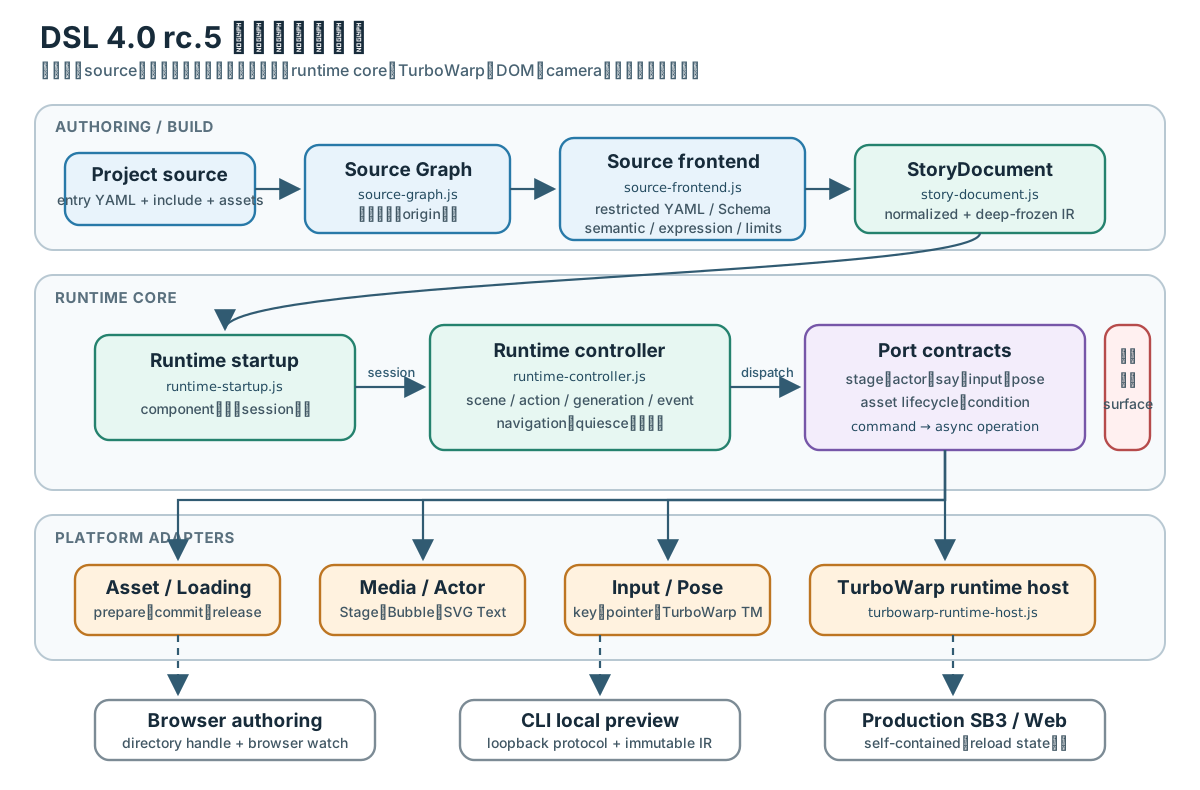
図: rc.8の実装moduleを責務ごとに配置したレイヤー構成。矢印は主な依存方向であり、各層の失敗は canonical diagnosticとして共通surfaceへ投影されます。
固定実装の呼出し経路
前図を実装のexportとcomposition rootまで具体化すると、固定commit29c0deaでは次の経路になります。
この追跡は、同commitの公開rc.8 SB3をbaseにしたlocal previewを実行し、immutable sourceの稼働、
Version 4.0.0-rc.8のタイトル、invalid保存時の診断とcurrent integrity維持を観測した結果と
突き合わせています。
createDsl4SourceGraphsource-graph.jsentryとincludeを有限探索→
createDsl4SourceGraphFrontend.parsesource-graph-frontend.js合成後にsingle-source frontendへ委譲→
createDsl4SourceFrontend.parsesource-frontend.jsYAML・Schema・semantic・Action Registry→
createStoryDocumentstory-document.js正規化してdeep-freeze→
createDsl4RuntimeStartupruntime-startup.jscomponentを検証しsessionを所有→
createDsl4RuntimeController.dispatchruntime-controller.jssceneとactionを順にportへ渡す→
createDsl4TurboWarpRuntimeEnvironmentturbowarp-runtime-host.jsportとlifecycleを構成
platform-asset-session.jsAsset Manager、背景、音、ポーズモデルをprepare・releasemedia-action-port.jsactor-action-port.jsStage、Actor、Bubble、SVG Textへ反映async-input-action-port.jspose-action-port.jsキー、タッチ、TurboWarp TM、カメラ、feedbackへ接続runtime coreはstage、say、pose等のcommand名でportを呼びます。TurboWarp VM、DOM、cameraをcoreから直接参照しないため、同じStoryDocumentをpreviewと配布成果物で共有できます。
実画面ではsource frontendの成功結果がVALID: The current immutable source is running.として表示され、
reload監視はWatchingになります。versionを4.1へ変えた一時candidateはK4-VERSION-001でINVALIDとなり、
current integrityを更新しませんでした。画面との対応、撮影条件、固定した成果物hashは
DSL 4.0 実装ビジュアル記録を参照してください。
正本の順序
- 作者向け構造の正本は
schema/dsl-4.schema.jsonです。 - parse後の追加制約は
src/dsl4/semantic-validator.jsと、注入されたRuntime Expression validatorが正本です。 - runtime入力の正本は
src/dsl4/story-document.jsが生成するStoryDocumentです。 - 実行状態とeventの正本は
src/dsl4/runtime-controller.jsです。 - platform能力は
src/dsl4/platform/のcomposition rootと各adapterが正本です。 - preview candidateの切替は
live-reload-session.js、asset byteの切替はasset-reload-transaction.jsが正本です。
Schemaからruntime実装を生成したり、runtimeの受理状態からSchemaを逆生成したりはしません。 Schema、semantic validator、StoryDocument、runtimeの各境界を独立testで同期します。
実装から検証できる関係表
次表は上から下への主要呼出し方向です。「主要関数」は固定commitに存在するexport、 「確認test」はその境界を直接検証するfileです。
| 層 | 入力 → 出力 | 主要path・関数 | 確認test |
|---|---|---|---|
| project read | project path → bounded source bytes | src/builder/dsl4-external-source.js、loadDsl4ExternalSource |
test/dsl4-external-source-loader.test.mjs |
| graph discovery | entry path → Source Graph | src/dsl4/source-graph.js、createDsl4SourceGraph |
test/dsl4-source-graph.test.mjs |
| graph composition | Source Graph → composed parse result | src/dsl4/source-graph-frontend.js、createDsl4SourceGraphFrontend |
test/dsl4-source-graph-frontend.test.mjs |
| source frontend | canonical YAML → diagnosticまたはStoryDocument |
src/dsl4/source-frontend.js、createDsl4SourceFrontend |
test/dsl4-schema.test.mjs、test/dsl4-source-limits.test.mjs |
| production composition | Schema + Runtime Expression → frontend | src/builder/dsl4-source-frontend.js、createDsl4ProductionSourceFrontend |
test/dsl4-expression-diagnostic-boundaries.test.mjs |
| artifact build | source + asset + base SB3 → verified runtime component | src/builder/dsl4-build.js、buildDsl4RuntimeComponent |
test/dsl4-one-shot-build.test.mjs |
| startup | packaged component → navigation session | src/dsl4/runtime-startup.js、createDsl4RuntimeStartup |
test/dsl4-runtime-startup.test.mjs |
| execution core | StoryDocument + port → runtime state・event |
src/dsl4/runtime-controller.js、createDsl4RuntimeController |
test/dsl4-runtime-controller.test.mjs |
| navigation | runtime + input + history → controlled movement | src/dsl4/navigation-session.js、createDsl4NavigationSession |
test/dsl4-navigation-session.test.mjs |
| platform composition | runtime component + TurboWarp host → port・asset lifecycle | src/dsl4/platform/turbowarp-runtime-host.js、createDsl4TurboWarpRuntimeEnvironment |
test/dsl4-turbowarp-runtime-host.test.mjs |
| source reload | immutable candidate → next runtime session | src/dsl4/live-reload-session.js、createDsl4LiveReloadSession |
test/dsl4-live-reload-session.test.mjs |
| asset reload | byte candidate → active asset generation | src/dsl4/asset-reload-transaction.js、createDsl4AssetReloadTransaction |
test/dsl4-asset-reload-transaction.test.mjs |
test/dsl4-architecture.test.mjsは、core import graphにnode:、DOM、Scratch VM、
platform moduleが侵入しないことを検査します。I/Oとplatform依存を注入するため、同じ
StoryDocumentとruntime coreを複数surfaceで共有できます。
図と実装の追跡表
| 図 | 主な実装正本 | 直接確認するtest |
|---|---|---|
| レイヤー構成 | source-graph.js、source-frontend.js、story-document.js、runtime-controller.js、platform/ |
dsl4-architecture.test.mjs |
| source build sequence | source-graph-frontend.js、builder/dsl4-source-frontend.js、builder/dsl4-build.js |
dsl4-source-graph-frontend.test.mjs、dsl4-one-shot-build.test.mjs |
| RuntimeStatus | runtime-controller.js |
dsl4-runtime-controller.test.mjs |
| 通常実行sequence | runtime-startup.js、navigation-session.js、runtime-controller.js |
dsl4-runtime-startup.test.mjs、dsl4-navigation-session.test.mjs |
| live reload state/sequence | live-reload-session.js、runtime-controller.js |
dsl4-live-reload-session.test.mjs、dsl4-live-reload-quiesce.test.mjs |
| asset reload sequence | asset-reload-transaction.js |
dsl4-asset-reload-transaction.test.mjs |
Source frontend
単一sourceの処理順
createDsl4SourceFrontend(schema, options)はSchemaをAJV 2020で一度compileし、parse()ごとに
次の順で処理します。
canonicalizeDsl4Sourceで改行とsource表現を規範化する。- UTF-8 byte上限を超えるsourceをYAML parse前に
K4-SOURCE-LIMIT-BYTES-001で拒否する。 - YAML 1.2 strict modeで、一つのtop-level mappingだけを読む。
- alias、anchor、merge key、custom tag、prototype汚染につながるmapping keyを拒否する。
- YAML node数、collection depth、scalar長を検査する。
- JSON Schemaで構造、型、未知field、action形を検査する。
validateDsl4Semanticsで参照、asset kind、重複stable ID、scene・pose条件などを検査する。- scene数、action数、asset数と、branch式の構文・上限を検査する。
- errorがなければ
createStoryDocumentでimmutable IRを生成する。
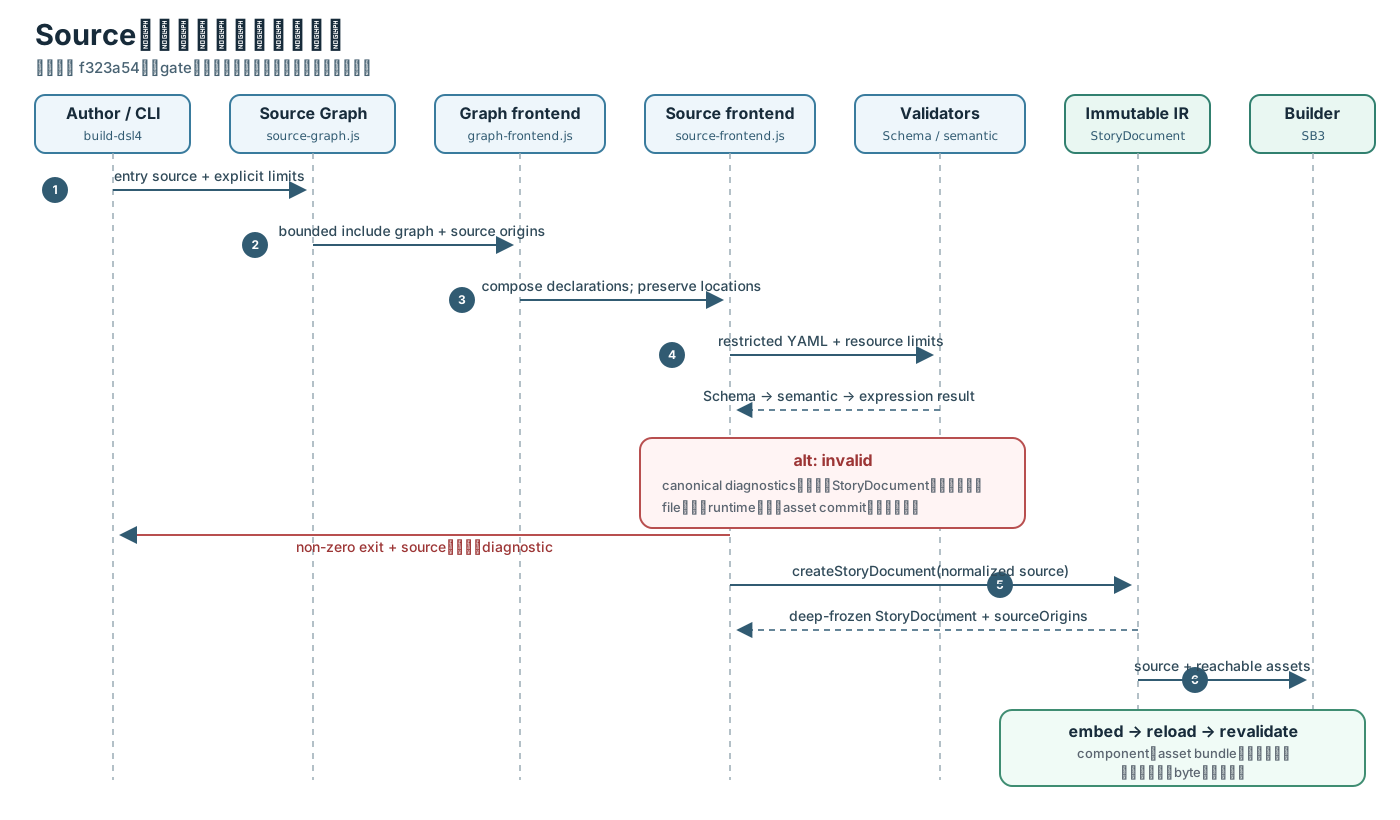
図: 失敗結果に部分的なStoryDocumentを含めず、成果物出力前に埋込み後のcomponentを再読込・再検証する
build gate。
戻り値はdiscriminated resultです。成功時は{ok: true, canonicalSource, diagnostics, storyDocument}、失敗時は{ok: false, canonicalSource, diagnostics}です。失敗結果に部分的な
StoryDocumentを載せないため、後段はokをstage gateとして使えます。
source frontendの既定上限はdsl4SourceFrontendDefaultLimitsに固定されています。
| field | 既定最大値 |
|---|---|
maxCanonicalSourceBytes |
256 KiB |
maxYamlNodes |
20,000 |
maxYamlDepth |
64 |
maxScalarScalars |
16,384 |
maxScenes |
512 |
maxActionsPerScene |
1,024 |
maxTotalActions |
4,096 |
maxAssets |
1,024 |
maxDiagnostics |
100 |
maxRelatedLocations |
8 |
callerはこの値以下へだけ狭めます。未知のlimit名、上限より大きい値、非整数は起動時に拒否します。
Source Graph
createDsl4SourceGraph(entryPath, {readSource, limits})はassetを読まず、source topologyだけを作ります。
各nodeはsourceIdとsourcePathを同じlogical project-relative pathとして持ち、canonical source、
byte数、include edge、宣言、宣言元に対して解決したasset file pathを保持します。
既定上限dsl4SourceGraphDefaultLimitsは次のとおりです。
| field | 既定最大値 |
|---|---|
maxSourceFiles |
64 |
maxSourceBytes |
1 MiB/source |
maxTotalSourceBytes |
4 MiB/graph |
maxIncludeDepth |
32 |
pathはproject rootから脱出できず、source suffixも検査します。cycleはK4-INCLUDE-CYCLE、
読込失敗はK4-INCLUDE-READ-001、同じnamespace・IDまたはsingletonの重複は
K4-DECLARATION-DUPLICATEで停止します。orderはdependency order、discoveryOrderはentryを
先頭とする安定した発見順です。
createDsl4SourceGraphFrontend(sourceFrontend)はdsl4SourceIncludesがONのときだけ動作します。
各nodeへrestricted YAML policyを適用し、named declarationとsingletonを一つへ構成します。
root優先や後勝ち規則はありません。構成後のcanonical sourceにも明示上限を適用し、その後は単一sourceと
同じfrontendへ渡します。
included sourceの宣言位置は失われません。生成後のStoryDocument.sourceOriginsはstory pathごとに
{sourceId, range}を持ち、runtime diagnosticはsourceOriginForStoryPath()で最も近い宣言元へ戻せます。
Schema、意味検証、式検証
検証境界は次のように分離します。
| 段階 | 拒否する例 | 実装 |
|---|---|---|
| Schema | 型違い、必須field欠落、未知top-level key、action形の不一致 | schema/dsl-4.schema.json + AJV 2020 |
| semantic | 存在しないscene・asset・actor参照、asset kind違い、pose model不足、重複stable ID | validateDsl4Semantics |
| expression | branch式のsyntax、token・depth上限、runtimeの未知・不正variable | Runtime Expression composition + expression-diagnostics.js |
| resource | source、YAML、scene、action、asset、diagnostic件数の超過 | source-frontend.js |
production compositionはcreateDsl4ProductionSourceFrontendが
@kubohiroya/turbowarp-runtime-expression/compositionを注入します。独自parser、eval、
Functionへのfallbackはありません。preview、validate、buildはこのfrontend契約を共有します。
runtimeではresolveBranch()がaction contextのvariables snapshotをevaluateCondition()へ渡し、一つのbranchを
上から評価します。4.0.0-rc.8のsnapshotに含まれるのはトップレベルvariables:だけで、Stage/sprite変数、
Temporary Variables、controller status、pose eventをliveには読みません。
StoryDocument
形とimmutability
createStoryDocument()はsource objectをcloneしてから再構成し、deepFreeze()した次のrootを返します。
{
  "kind": "StoryDocument",
  "version": "4.0",
  "metadata": {"sourceId": "project/story.k4.yml"},
  "assets": {},
  "actors": {},
  "cover": null,
  "textStyles": {},
  "speechStyles": {},
  "variables": {},
  "loading": null,
  "poseRecognition": null,
  "controls": null,
  "branches": {},
  "scenes": [],
  "sourceMap": {}
}
Source Graph経由ではさらにsourceOriginsが加わります。assetsはIDをkeyとし、compact記法も
id、kind、name、delivery、loading、retentionを持つobjectへ正規化します。
既定のdeliveryはembedded、loadingはeager、retentionはpose modelだけscene、
その他はstoryです。
scenesは宣言順の配列です。各sceneは{kind: 'Scene', id, poseModel, posePreview, actions}、
各actionは次の形です。
YAML 1.2のmappingはrepresentation model上で順序を持ちません。DSL 4.0は固有規則として、source YAMLの
serialization treeに現れるscenes pairの順序を通常実行のscene順とします。source frontendはYAML nodeの
pair列、または全scene IDで同値な順序を保証する中間表現からStoryDocument.scenesを構築し、JSON Schema検証用の
native objectが持つproperty列挙順を正本にしてはいけません。formatter、converter、serializerもscene keyを
sortせず、parse、serialize、parseのround tripで同じpair順を保持します。
現行実装はDocument#toJS()後のscenesをObject.entries()で配列化するため、ECMAScriptのarray index相当の
scene IDではsource順を失います。例えば"10"、"2"、"1"の順に宣言したsceneが"1"、"2"、
"10"の順になります。これは意図した契約ではなく既知の適合差です。toolはこの挙動を互換仕様として固定せず、
YAML nodeのpair順から正規化する実装へ置換します。
{
  "kind": "Action",
  "id": "/scenes/opening/actions/0",
  "target": "Hero",
  "command": "say",
  "args": {"text": "こんにちは"},
  "sourceRange": {}
}
custom actionだけhandler: 'custom'を持ち、明示された場合はstableIdも持ちます。idは
StoryDocument内のstory pathであり、Scratch block IDではありません。
source位置
sourceMapはstory pathからcanonical sourceのSourceRangeへ対応します。SourceRangeは
1-originのline・columnと0-originのoffsetを持つstart・endです。診断は
作者向けpathに加え、利用できる場合はstoryPathを持ちます。included sourceでは
sourceOriginsからlogical source pathを復元し、絶対machine pathを公開しません。
RuntimeとAction Context
起動境界
createDsl4RuntimeStartup()は起動時に一度resolveDsl4FeatureFlags()を呼びます。
dsl4RuntimeがOFFならdependencyを初期化せずenabled: falseを返します。ONならpackaged componentを
検証し、hostが明示したsource・asset上限の下でStoryDocument、runtime artifact、asset bundleを読み、
createDsl4NavigationSession()へ渡します。
runtime environmentは次を提供します。
port: action command名をkeyとするplatform operationassetLifecycle:prepare、setLoading、releaseAssets、releaseevaluateCondition: branch式評価inputArbitration: navigationと作品内inputの競合を一つのconsumerへ決める契約dispose(reason): environmentが所有する全resourceの冪等解放
sessionはenvironmentを単独所有します。session dispose時はnavigationを停止した後、environmentを解放し、
双方のcleanup失敗をAggregateErrorへまとめます。
RuntimeStatusとsnapshot
createDsl4RuntimeController()のRuntimeStatusはidle、running、paused、failed、
finished、stoppedです。公開snapshotはstatus、sceneId、actionIndex、actionPath、
generation、primitiveだけのvariables、失敗時のdiagnosticをdeep-freezeして返します。
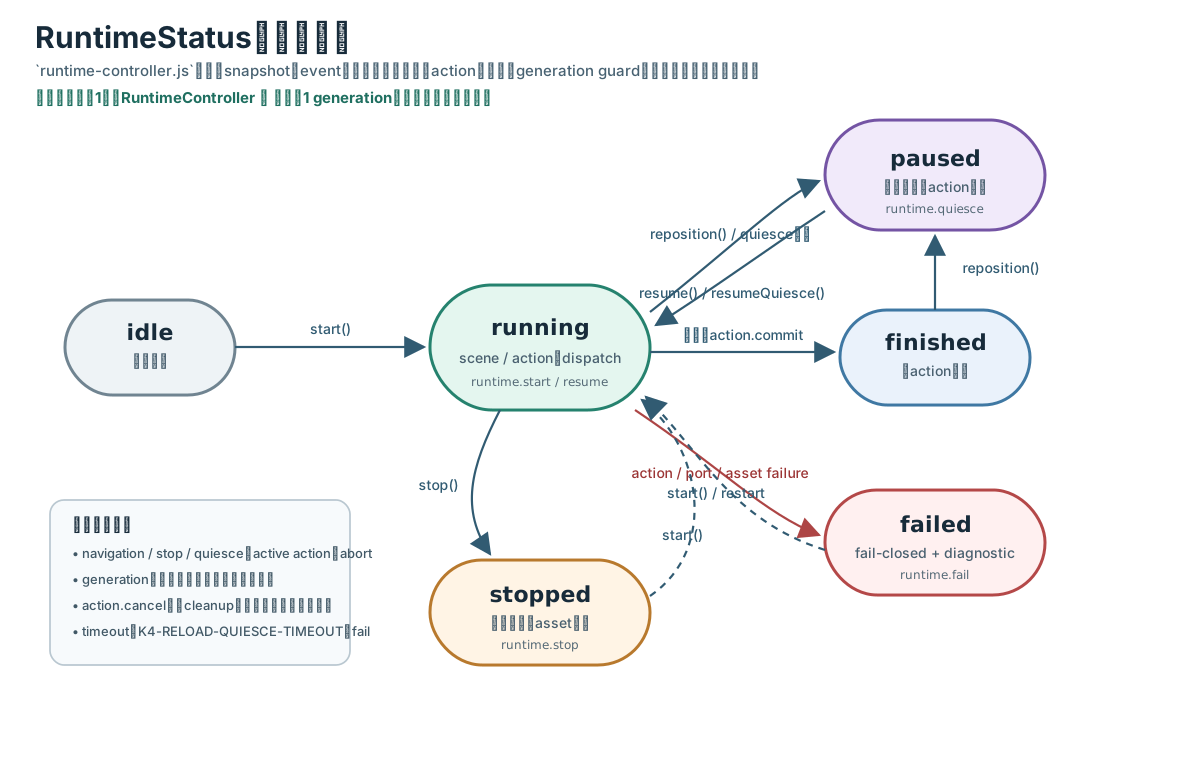
図: start()、reposition()、quiesce、resume()、正常終了、失敗、停止の遷移。破線はterminal状態から
再度start()したときの再初期化を表します。
この図の主体は一つのRuntimeControllerです。「現在の一つのgenerationを、どのscene・action位置で
どう再生しているか」だけを表します。source変更の有無、candidateの妥当性、作者がreloadを承認したかは
RuntimeStatusへ混ぜません。それらは後述するLiveReloadSessionが別の状態として持ちます。
| 現在状態 | 操作・条件 | 次状態 | 主なevent |
|---|---|---|---|
idle、finished、failed、stopped |
start() |
running |
runtime.start、scene.transition、scene.enter |
running |
action dispatch開始 | running |
action.start |
running |
action正常完了 | running |
action.commit |
running |
goto、branch、input route |
runningのまま別scene |
scene.transition、scene.enter |
running |
最後のaction完了 | finished |
runtime.finish |
running |
action、port、式、asset失敗 | failed |
runtime.fail |
running |
navigation、reloadで現在actionを取消 | runningまたはpaused |
action.cancel |
running、finished |
reposition() |
paused |
navigation.reposition |
paused |
resume() |
running |
runtime.resume |
running、paused |
stop() |
stopped |
runtime.stop |
scene transitionはtarget sceneのlazy assetをprepareしてからtransitionTo()をpublishします。
scene commit後に不要なscene-retained assetを解放します。準備失敗時は現在sceneを置き換えません。
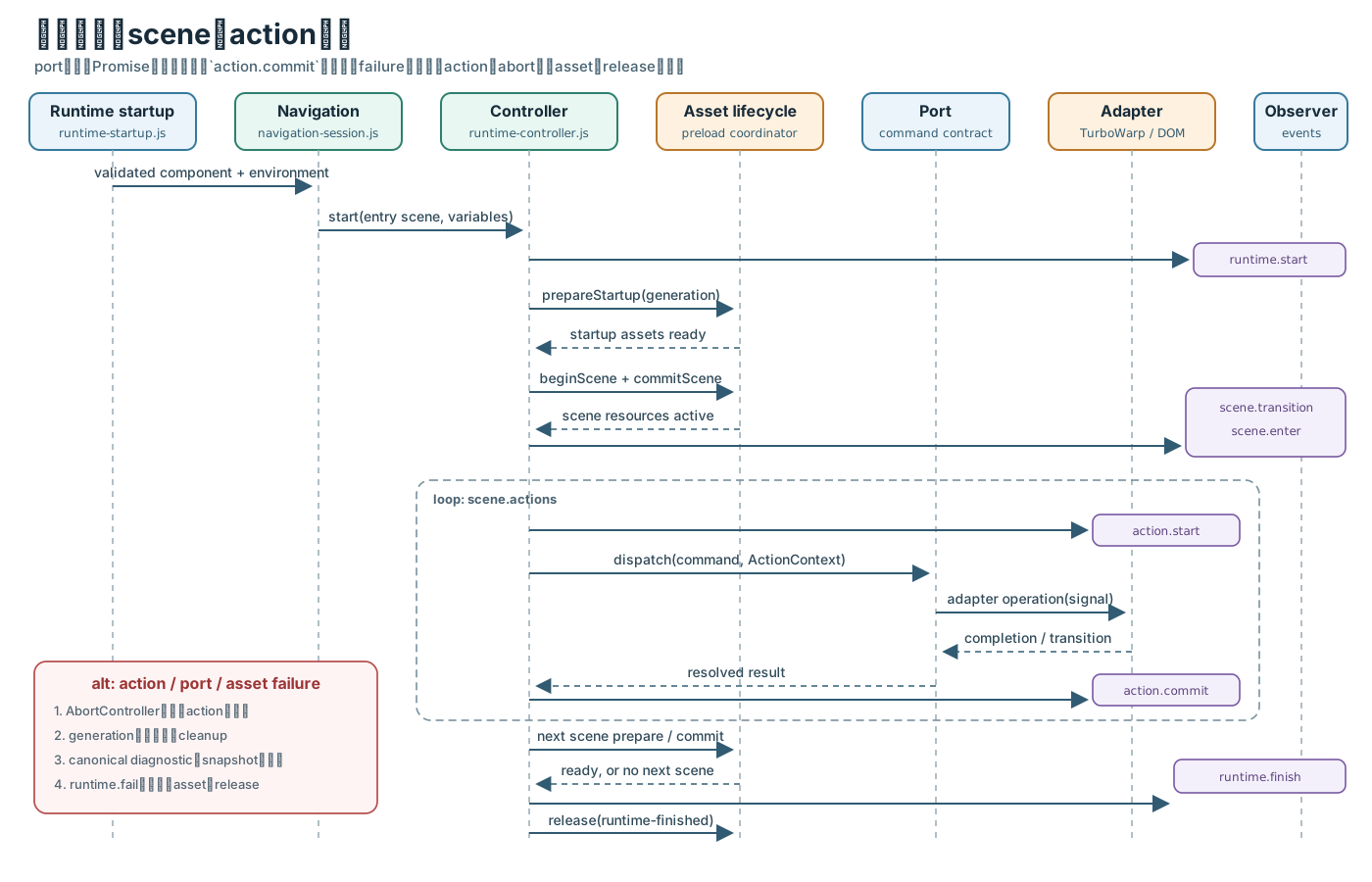
図: portが返す非同期operationの完了後だけaction.commitへ進みます。action、port、式、assetの失敗は
current generationを無効化し、canonical diagnosticとruntime.failへ収束します。
RuntimeEvent
eventは{sequence, type, sceneId, storyPath, actionPath, generation, details}です。
sequenceはstartごとに0へ戻り、observerは実行意味を変更できません。onEventがthrowしてもruntimeは継続します。
主要typeは次です。
- lifecycle:
runtime.start、runtime.resume、runtime.finish、runtime.fail、runtime.stop - scene:
scene.transition、scene.enter - action:
action.start、action.commit、action.cancel - navigation:
navigation.advance、navigation.reposition -
asset:
assets.startup.start、assets.startup.ready、assets.preload.start、assets.loading.show、assets.loading.hide、assets.scene.ready、assets.release - reload boundary:
runtime.quiesce
Action Context
coreが各actionへ渡すActionContextは次を持ちます。
| member | 契約 |
|---|---|
signal |
action取消とともにabortされるAbortSignal |
generation |
action開始時のruntime generation |
sceneId、actionPath |
現在位置の安定した識別子 |
variables |
action開始時のimmutable primitive snapshot |
getVariable(name) |
現在値の読取 |
setVariable(name, value) |
current generation、未abort、宣言済み、同じ型のときだけ更新 |
createAdvanceWait() |
speech advance flag有効時の一回限りの待機handle |
structuredData |
有効時だけ渡すactionScopeRefとactionViewRef |
generationとsignalの両方を検査するため、取消済みの非同期actionが遅れて完了しても変数やsceneをcommitできません。
custom actionは別の起動時flag dsl4CustomActionsEnabledで既定OFFです。
createDsl4ActionInvocationAdapter()がAction Registry Snapshot、Structured Dataのaction scope、
TurboWarp primary threadを一つのinvocationへ束ねます。invocationはrunningからcompleted、
transitioned、failed、cancelledのいずれかへ一度だけsettleします。既定timeoutは30秒です。
createDsl4ActionContextTurboWarpSurface()はunsandboxed TurboWarp hostへ、次の開発者blockを
flag ON時だけ登録します。
whenCustomActioncurrentActionName、currentActionTargetcurrentActionHasArgument、currentActionArgumentcompleteCurrentAction、failCurrentAction、gotoFromCurrentAction
contextがないthread、二重settle、未知引数、不正goto、timeout、thread cleanup失敗は
K4-CUSTOM-*診断へ変換されます。
Platform adapter
coreはbrowser global、DOM、Scratch API、filesystem、networkを直接参照しません。
src/dsl4/platform/が外部能力を注入し、createDsl4TurboWarpRuntimeEnvironment()がport衝突と
作品が要求するcommandの欠落を起動時に検査します。
| adapter/port | 担当能力 | 主なruntime command・resource |
|---|---|---|
asset-manager-adapter.js |
backdrop、costume、image、soundの登録・解放 | Asset Manager composition |
tm-model-adapter.js |
pose model bundleの登録・label取得・解放 | TurboWarp TM composition |
platform-asset-session.js |
asset adapter、verified remote cache、binary entry、Async Inputの所有 | assetLifecycle、pose/input composition |
media-action-port.js |
stage、BGM、sound、Actor skin | stage、bgm、sound、setSkin |
actor-action-port.js |
actor表示、発話、移動、透明度 | show、hide、say、think、moveTo、setTransparency |
svg-text-action-port.js |
SVG Text targetとstyle | setText |
pose-action-port.js |
pose sequence・selectionとfeedback event | pose、poseInputToChangeScene |
async-input-action-port.js |
key・touch route | keyInputToChangeScene、touchInputToChangeScene |
camera-preview-controls.js |
preview mirror、camera menu、reserved layout | DOM controlとcamera port |
turbowarp-actor-adapter.js |
actor target、speech、transitionをTurboWarpへ接続 | VM target・scheduler |
createDsl4StandardAppShell()が受理するsurface名はwebPlayer、regularEditor、packager、
developmentPreviewです。pose feedback用DOMは必要になるまで作らず、shell disposeはruntime hostを
先に解放してからmountを削除します。
Asset lifecycle
build時のsnapshot
buildDsl4RuntimeComponent()は検証済みStoryDocumentが参照するlocal assetだけを
loadDsl4LocalAssetSnapshot()で読みます。fileごとのbyte上限、件数、総byte数を明示し、
integrity付きassetBundle、sourceDescriptor、runtimeArtifactを作成します。base SB3へ埋め込んだ後、
loadDsl4RuntimeComponent()で同じ上限を使って再読込し、成功したbyteだけを返します。
file出力はbuildDsl4RuntimeComponentFile()がcandidate directoryを検証し、
installBundleTransactionally()で置き換えます。検証に失敗した途中SB3を最終出力へ残しません。
runtime prepareとretention
createDsl4EmbeddedAssetLifecycle()はasset IDごとにpending、ready、failedのcache entryを持ちます。
prepare()はasset materializeとplatform adapter prepareを行い、generationがstaleまたはsignalがabort済みなら
作成済みresourceを即座にreleaseします。
createDsl4AssetPreloadCoordinator()はasset kindを知らず、dependency indexに従って時期だけを調整します。
- startupでcover、loading、actor、eager assetをprepareする。
- scene開始前にそのsceneのlazy assetをprepareする。
- pending中だけloading presentationを表示する。
- 準備完了後にscene transitionをpublishする。
- scene commitで次sceneに不要な
retention: sceneassetをreleaseする。 - stop、failure、disposeで全resourceを逆所有順に解放する。
PoseモデルについてposeRecognition.modelInitialization.policyがlatest-neededの場合、preload coordinatorの
最新要求をTurboWarp TM 1.12.0 Compositionへ渡し、重い初期化をactive 1件+最新pending 1件へ制限します。
superseded requestはasset lifecycleのAbortSignalでcancelし、registryへ公開しません。Aの実行中にB、Cが
要求された場合はBを開始せず、Aの安全な終了後にCだけを開始します。pose不要sceneへskipした場合はpendingを
破棄します。
camera lifecycleとmodel lifecycleは別の所有者です。getUserMedia()/video.play()はdescriptor探索、
decode、SHA検証、TensorFlow/PoseNet初期化と並行できます。未検証byte列をTensorFlowへ渡してはならず、
最初の推論でcamera readyとmodel registeredを同期します。model cancelだけでcameraを停止せず、stopまたは
session disposeがcameraを解放します。既定値legacy/parallel: falseはこの最適化を無効化します。
poseRecognition.preview.overlayがある場合、hostは正規化済みの表示、joint style、bone style、最低confidence、
confidence連動をTurboWarp TM 1.12.0の公開Composition APIへ順番に適用します。overlay専用feature flagはありません。
camera canvas、2D context、推論readback、SVG要素はTurboWarp TMが所有し、hostはDOMやTensorFlow.js内部経路をpatchしません。
remote assetは自動的に許可しません。createDsl4RemoteAssetLifecycle()へhost loaderを明示注入した場合だけ
有効です。通常のposeModelはHTTPS directory URLからmodel.json、metadata.json、宣言されたweightsを
lazy取得します。検証付きremoteはSHA-256 integrity、media type、sizeを再検証して同じlifecycleへ入ります。
Transaction、snapshot、commit/rollback
source generation transaction
Web/CLI previewは安定読込を二回行い、source graphとasset manifestのfingerprintが一致した一式だけを generationとしてstageします。途中保存、sourceだけ新しい状態、assetだけ新しい状態はprotocolへ公開しません。 invalid candidateはdiagnosticだけを更新し、current runtimeを維持します。
createDsl4LiveReloadSession()の状態はwaiting、active、invalid、quiescing、pending、
failed、disposedです。
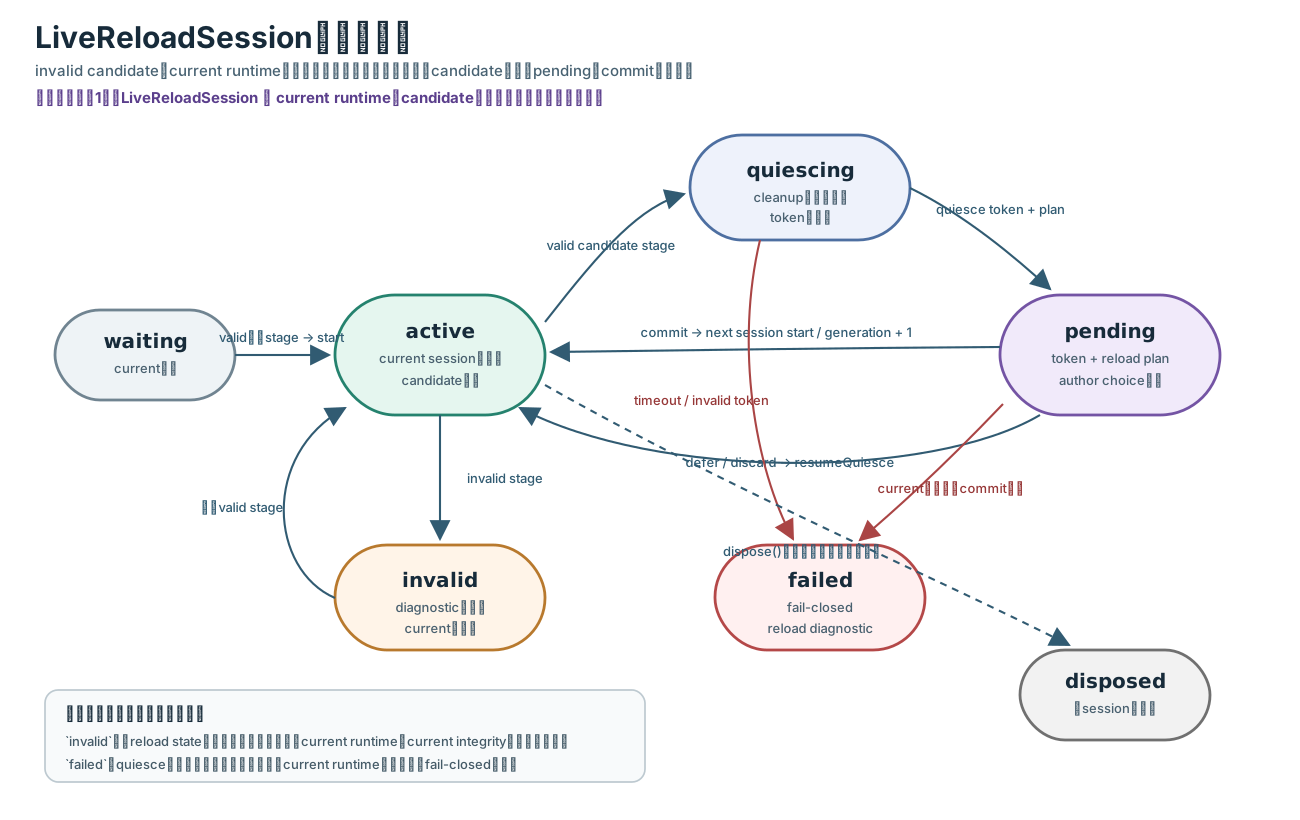
図: invalidはreload表示の状態であり、current runtimeを停止する状態ではありません。quiesceの安全性を
証明できない場合だけfailedへfail-closedします。
RuntimeStatusとの読み分け
二つの状態機械は階層が異なり、同じ時点に併存します。LiveReloadSession.getState()は外側の
reload statusだけでなく、current.runtime.statusとして内側のRuntimeStatusも保持します。
UIやprotocolはこの二つを一つの状態へ平坦化してはなりません。
| 観点 | RuntimeStatus |
LiveReloadSession.status |
|---|---|---|
| 状態を持つ主体 | 一つのRuntimeController |
一つのLiveReloadSession |
| 答える問い | current generationを今どう再生しているか | currentとcandidateの更新を今どう調停しているか |
| 時間の単位 | 一回のstart()と、そのgeneration内のscene・action実行 |
source監視開始から複数generationのstage・defer・commitまで |
| 主な入力 | start、action完了、navigation、resume、stop、実行失敗 |
parse結果、candidate、quiesce token、作者のchoice、dispose |
| 待機を表す状態 | paused: current runtimeが再開可能な実行境界で停止 |
pending: candidateとreload planが揃い、作者の選択を待つ |
failedの意味 |
action・port・式・assetなど、current generationの実行失敗 | quiesceまたはcommitを安全に完了できず、更新調停をfail-closedした |
| 正常終了・所有終了 | finished: 作品の全action完了、stopped: currentの明示停止 |
disposed: currentとcandidateを含むreload session全体の所有・監視終了 |
特にactiveは「runtimeがrunning」という意味ではなく、current sessionを保持し、candidateがない
というreload側の状態です。このため、作品が最後まで進んだ後もfinished + activeになり得ます。
同様に、invalidとfailedは二つの図で同じ失敗を重複表現しているのではありません。
| 代表的な時点 | current.runtime.status |
LiveReloadSession.status |
二つを分ける理由 |
|---|---|---|---|
| valid sourceを通常再生中 | running |
active |
実行中であり、更新候補はない |
| 保存したcandidateがinvalid | running |
invalid |
診断を表示しても、検証済みcurrentの再生は止めない |
| valid candidateを安全化中 | running→pausedなど |
quiescing |
action cleanupとtoken確定を待つ間も、更新処理の進捗を別に示す |
| reload choice待ち | pausedまたはfinished |
pending |
currentの安全な位置と、candidate採用の意思決定を区別する |
| 作品が正常終了、監視は継続 | finished |
active |
再生完了後も次のsource変更を受け付けられる |
| current自体のaction実行が失敗 | failed |
active |
実行失敗であり、reload transactionの失敗とは限らない |
| quiesce/commit安全性が破綻 | stopped |
failed |
currentをfail-closed停止し、更新失敗の原因と所有状態を外側へ残す |
| previewを閉じる | currentなし | disposed |
個別runtimeの状態ではなく、reload session全体のresource解放を表す |
したがって、RuntimeStatus図だけではinvalid candidateを表示しながらcurrentを継続する契約を表せず、
LiveReloadSession図だけではscene・actionの進行、正常終了、実行失敗を表せません。安全なlive reloadは
「内側の実行状態」と「外側の世代交代状態」を同時に観測するため、二図を併記します。
- 最初のvalid generationは新sessionを作り、先頭から開始して
activeにする。 - 次のvalid generationはcandidate IDを発行し、current sessionへ
quiesce()を要求する。 Dsl4QuiesceTokenのscene、action、variables、generationを検証する。- reload plannerが
storyStart、currentScene、currentActionの可否とfallbackを決める。 defer()はcandidateを捨て、current sessionをresumeQuiesce()する。commit()はnext sessionを先に生成し、currentを停止・解放してから選択位置でnextをstartする。
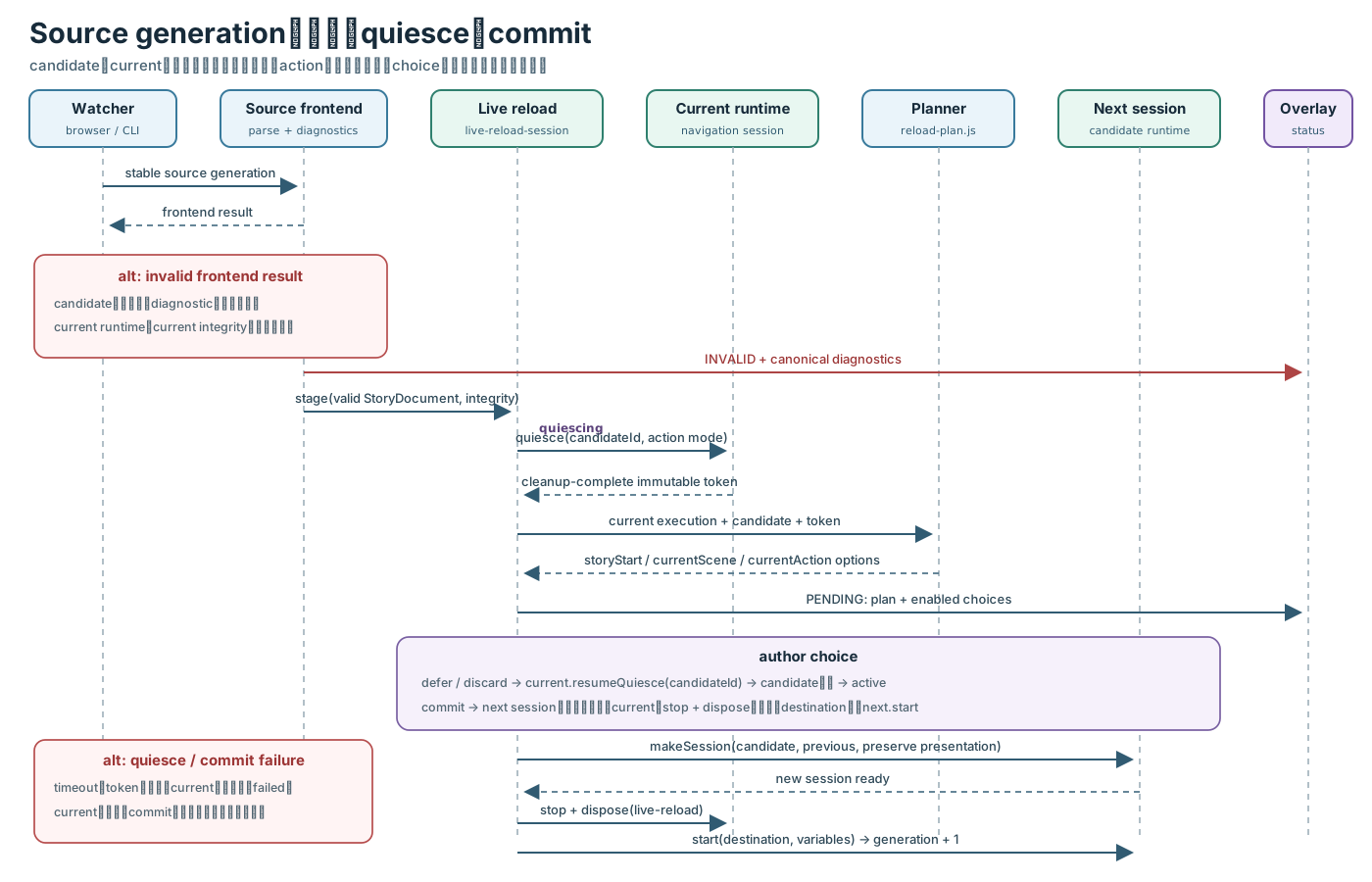
図: invalid、defer、commit、quiesce/commit failureを分けたsource generation transaction。candidateと currentの同時公開を避け、commit成功時だけgenerationとintegrityを切り替えます。
source session commitはcandidate生成前までcurrentを保持します。ただしcurrentを停止した後にnext startが
失敗した場合、停止済みcurrentへ暗黙rollbackはせずfailedにします。作者が明示的にrestartし、同じ失敗を
自動loopさせないのが安全側の契約です。
action quiesce
action handlerはfinish-onlyまたはcancel-replay-safeです。finish-onlyは現在actionが完了した次のdispatch境界で
pauseします。cancel-replay-safeはactionをabortし、Structured Data scopeとplatform resourceのcleanup完了後、
同じactionを再実行できる境界をtoken化します。既定5秒、許容100 ms〜30秒のtimeoutを超えると
K4-RELOAD-QUIESCE-TIMEOUTでruntimeをfail-closed停止します。
asset live reload transaction
createDsl4AssetReloadTransaction()の状態はidle、preparing、ready、applying、active、
diagnostic、full-rebuild、disposedです。
candidateはrevision、provider ID、source・graph・content integrity、change classification、affected scene、 validation summaryを持ちます。byteや絶対pathはprotocol summaryへ含めません。
| 変更 | classification | 処理 |
|---|---|---|
| 内容不変 | no-change |
何もしない |
| sourceのみ | source-live-reload |
source candidateとして処理 |
| 既存asset内容のみ | asset-live-reload |
asset candidateをprepare |
| source + 既存内容 | composite-live-reload |
一つのgenerationとしてcommit |
| source + 新規file-backed ID | additive-composite-live-reload |
追加分を含む一つのgenerationとしてcommit |
| 削除、rename、kind・path・bundle shape変更 | full-rebuild |
currentを維持しCLI buildを要求 |
commitはprepare済みcandidateへactivate()を呼び、adapterのrevision受理を確認します。activate失敗時は
rollback('activation-failed')、release()、adapter discardを順に試し、旧active generationを維持します。
成功時はpreview.asset.committed acknowledgementをpublishしてから旧generationをreleaseします。
ack後の旧resource解放失敗はcommitを取消さずK4-ASSET-RELEASE-001とし、disposeで再試行します。
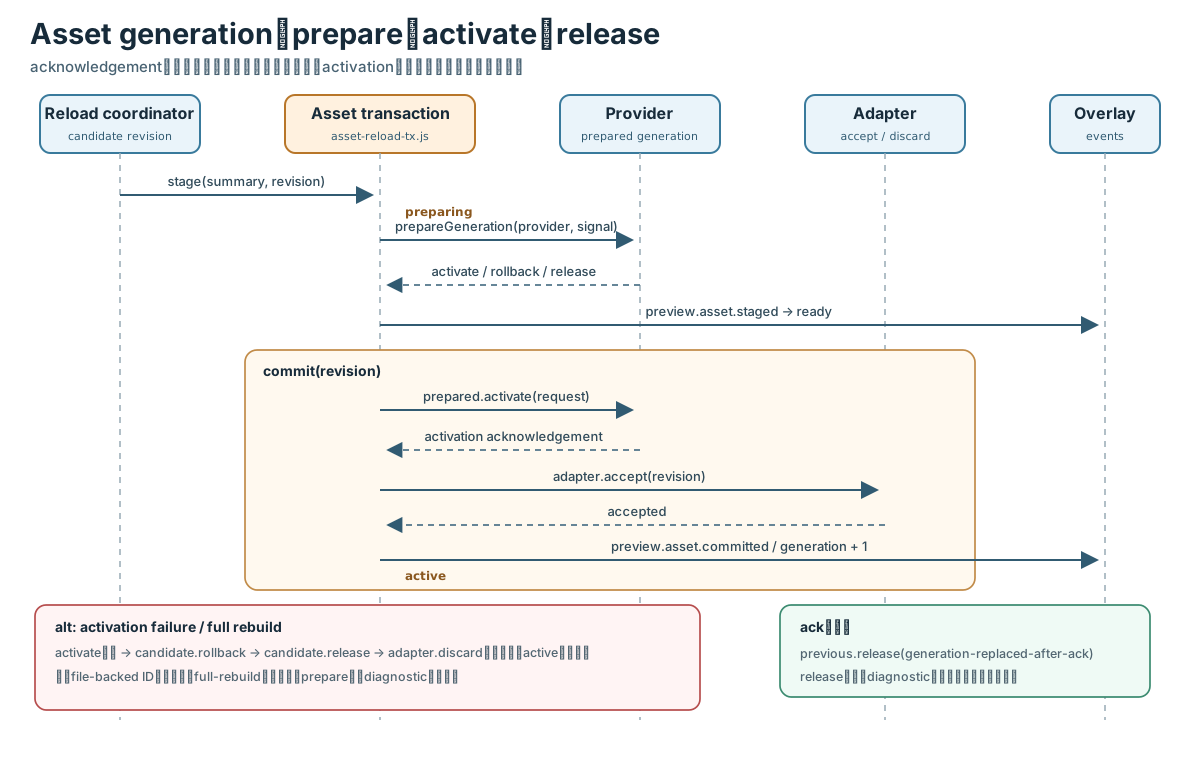
図: activation失敗時はcandidateをrollback・release・discardし、旧active generationを維持します。 full rebuild分類はcandidateをprepareせず、作者へ明示します。
診断と安全停止
canonical diagnostic v1は次を持ちます。
{
  "version": 1,
  "code": "K4-RUNTIME-ACTION-001",
  "severity": "error",
  "message": "Runtime operation failed",
  "sourceId": "chapters/opening.k4.yml",
  "range": {
    "start": {"line": 12, "column": 7, "offset": 180},
    "end": {"line": 12, "column": 18, "offset": 191}
  },
  "storyPath": "/scenes/opening/actions/2",
  "path": "$.scenes.opening[2]",
  "related": []
}
storyPathだけが任意です。source frontendは位置、code、messageの決定的順序へ正規化し、100件を超える場合は
K4-DIAGNOSTICS-TRUNCATEDを最後の一件として追加します。UI、clipboard、telemetryへsource本文、
runtime variable値、絶対path、handle、tokenを渡しません。
runtime failureは現在actionをabortし、generationを無効化し、Structured Data action・story scope、
asset、input、camera control、platform environmentを所有者順に解放してfailedへ移ります。
cleanup observerがthrowしても元の実行意味を変更せず、複数cleanup failureは内部で集約します。
Surfaceごとの能力差
三surfaceともproduction source frontend、StoryDocument、runtime controller、navigation、platform port、
canonical diagnosticを共有します。違いはsource・assetの取得方法とdevelopment-only reload能力です。
| 能力 | Browser Web Preview | CLI Preview | Production SB3 |
|---|---|---|---|
| 起点 | secure top-level pageのshowDirectoryPicker({mode: 'read'}) |
preview-dsl4 --watchとproject path |
build-dsl4で生成した自己完結SB3 |
| source所有者 | browserのread-only directory handle | Node hostがbounded readし、browserへ検証済みIRを送る | SB3内のsource descriptor |
| runtime所有者 | browser TurboWarp environment | browser pageのTurboWarp VM・renderer | Editor、Web player、Packager内のStandard runtime |
| Source Graph | flag ON時にbrowser内で構成 | flag ON時にNodeで構成 | build時に構成済み |
| watch | foreground 500 ms、hidden 5 sのpoll | filesystem watch + stable read | なし |
| source reload | candidate、defer、restart choice | 認証済みNDJSON generation、共通overlay | なし |
| asset reload | optional transactional live reload | generation更新またはfull rebuild | なし |
| transport | directory handleはmemory-only、remote previewなし | literal loopback、one-use token、Origin + bearer検証 | preview transportなし |
| camera・DOM | browser adapterで利用 | browser-owned stageで利用 | 実行surfaceが提供する能力だけ利用 |
| 永続化禁止 | handle、timer、candidate、reload UI state | token、absolute path、watch state | preview field・module・opcodeを格納しない |
CLI previewではNodeがproduction frontendで一度parseし、version付き
preview.source.generationとしてimmutable StoryDocument、diagnostic、source ID、byte数、SRIだけを送ります。
raw/canonical YAML、絶対path、tokenはwireに含めません。browserはYAMLを再parseせず、IRをruntime bridgeへstageします。
production SB3はsource、runtime artifact、asset bundleを自己完結させ、埋込み後に再検証します。
previewBridge、previewToken、reloadCandidate、directory handle、reload overlayなどのdevelopment stateを
保存しません。test/fixtures/dsl4/preview-production-exclusion.jsonと
test/dsl4-packaged-runtime-component.test.mjsがこの境界を固定します。
Feature flagとrollback
runtime全体のflagはsrc/dsl4/feature-flags.jsで読み、すべて既定OFFです。snapshotは起動時に固定し、
session途中で切り替えません。
| flag | 前提 | OFF時の境界 |
|---|---|---|
dsl4Runtime |
なし | runtime dependencyを初期化しない |
dsl4SourceIncludes |
dsl4Runtime |
単一source frontendへ戻る |
dsl4AppShell |
dsl4Runtime |
Standard shell DOMを作らない |
dsl4WebPreviewAdapter |
runtime + app shell | directory pickerとbrowser watchを作らない |
dsl4WebPreviewAssetLiveReload |
runtime + app shell + Web Preview | source-only reload/full rebuildへ戻る |
dsl4PreviewReloadOverlay |
runtime + app shell | candidate UIを作らない |
dsl4PoseFeedbackModes |
なし | 追加feedback presenterを作らない |
dsl4PosePreviewMirroring |
なし | pose preview mirror portを要求しない |
dsl4CameraPreviewControls |
なし | camera menuとmirror controlを作らない |
dsl4SpeechAdvanceTypewriter |
dsl4Runtime |
extended speech actionを拒否する |
structuredDataIntegrationEnabled |
なし | action scope・viewを作らない |
custom actionのdsl4CustomActionsEnabledはaction-context-turbowarp.jsで別に管理し、既定OFFです。
rollbackは該当flagをOFFにしてprocessまたはsessionを再起動します。既定値をONへ変更したり、 Schema、StoryDocument、artifact format、保存済みSB3をmigrationしたりしません。productionに問題がある場合は 直前の検証済みSB3とexact dependency pinへ戻し、preview stateはsession-ownedのためdata cleanupを必要としません。
実装を変更するときの確認表
| 変更箇所 | 同時に確認する契約 |
|---|---|
| Schema field・action | Schema snapshot、semantic validator、StoryDocument正規化、author guide、schema reference |
| include・path解決 | Source Graph limits、cycle・duplicate診断、source origin、browser/Node graph generation |
| StoryDocument field | artifact loader、reload planner、Structured Data view、runtime controller |
| runtime command | semantic validator、port capability検査、platform adapter、cancel・failure test |
| action state | RuntimeEvent、generation guard、quiesce token、history reducer |
| asset kind・retention | dependency index、bundle descriptor、adapter router、preload coordinator、release test |
| preview protocol | capability negotiation、revision単調性、redaction、production exclusion |
| feature flag | default-off snapshot、依存関係、flag-off import/resource test、rollback記述 |
最低限、pnpm lint、pnpm format、pnpm typecheck、pnpm test、pnpm buildを実行します。
runtime側の仕様変更では、表に示した固定commitの対応testも更新し、文書だけを先行して正本にしません。