webgpu-react-bitmap-viewport
WebGPU-React-Bitmap-Viewport - a React component that uses WebGPU to render bitmap data within a set of viewports synchronously


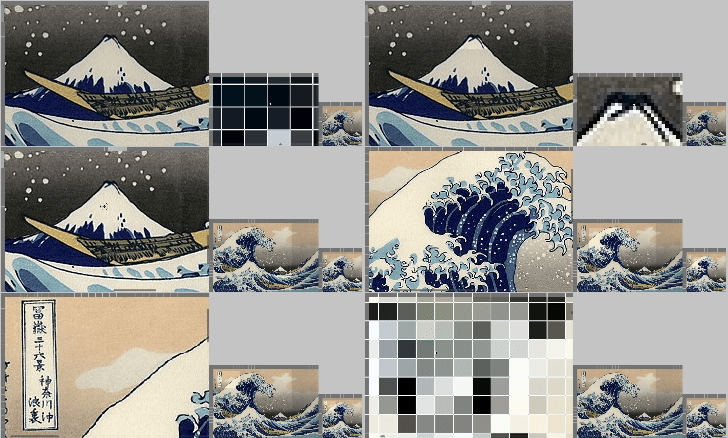
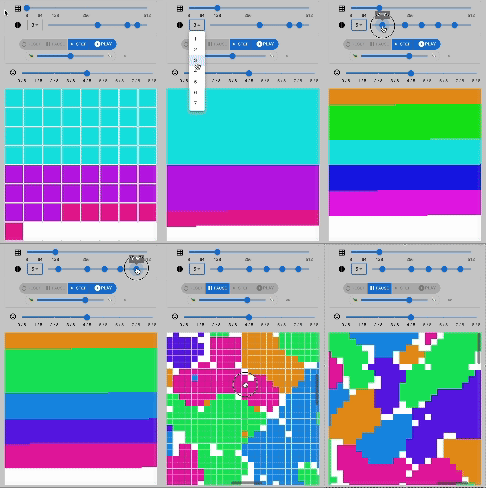
- A React component displaying bitmap data as a set of viewport contents with use of WebGPU API, without dependencies other than React.
- Dynamic synchronization of GPUBuffers from JavaScript image data (e.g., Uint32Array of RGBA color values).
- Dynamic extraction and rendering a set of (one or more) viewport contents from GPUBuffers.
- Interactive viewport navigation via mouse drag and scrollbar handling, as well as zoom in and out via the mouse wheel.
- Customizable for bitmap image size, viewport display size, canvas size, header area size, and scrollbar size through React component props.
- Highlights the column and row under the current mouse pointer.
- Allows toggling the selected state of each column and row, and highlight the selected ones.
Download and Installation
Download the latest version of webgpu-react-bitmap-viewport from the npm repository:
pnpm install webgpu-react-bitmap-viewport
API
Live Demo
cd examples
pnpm install && pnpm dev
- Synchronized Viewports of Static Image: "The Grate Wave off Kanagawa" from the series Thirty-six Views of Mount Fuji by Hokusai
- Synchronized Viewports of Dynamic Image: Randomly generated data
- Viewport of Multi Agent Simulation: Schelling's model of segregation implemented with Vanilla-JS/WebGPU/WebAssembly
Code Example
import { Grid, GridHandles } from "webgpu-react-bitmap-viewport";
import { useRef } from "react";
const gridSize = { numColumns: 128, numRows: 128 };
const data = new Float32Array(gridSize.numRows * gridSize.numColumns);
for (let i = 0; i < data.length; i++) {
if (Math.random() < 0.99) {
data[i] = i / data.length;
} else {
data[i] = Infinity;
}
}
const focusedCellPosition = new Uint32Array([-1, -1]);
const selectedStates = new Uint32Array(Math.ceil(gridSize.numRows * gridSize.numColumns / 32));
const viewportStates = new Float32Array([
0.0, 0.0, 16.0, 16.0, // viewport index 0: left, top, right, bottom
8.0, 8.0, 24.0, 24.0, // viewport index 1: left, top, right, bottom
]);
export const Index = () => {
const gridHandlerRefs =
[
useRef<GridHandles>(null),
useRef<GridHandles>(null)
];
return (
<>
<Grid
index={0}
ref={gridHandlerRefs[0]}
numViewports={2}
headerOffset={{ left: 10, top: 10 }}
canvasSize={{ width: 138, height: 138 }}
numColumns={gridSize.numColumns}
numRows={gridSize.numRows}
scrollBar={{
radius: 5.0,
margin: 2.0,
}}
data={data}
focusedCellPosition={focusedCellPosition}
selectedStates={selectedStates}
viewportStates={viewportStates}
onFocusedCellPositionChange={(sourceIndex: number, columnIndex: number, rowIndex: number) => {
gridHandlerRefs[1].current?.refreshFocusedCellPosition(sourceIndex, columnIndex, rowIndex);
}}
onSelectedStateChange={(sourceIndex:number, columnIndex: number, rowIndex: number) => {
gridHandlerRefs[1].current?.refreshSelectedState(sourceIndex, columnIndex, rowIndex);
}}
onViewportStateChange={(sourceIndex: number) => {
gridHandlerRefs[1].current?.refreshViewportState(sourceIndex);
}}
/>
<Grid
index={1}
ref={gridHandlerRefs[1]}
numViewports={2}
headerOffset={{ left: 10, top: 10 }}
canvasSize={{ width: 138, height: 138 }}
numColumns={gridSize.numColumns}
numRows={gridSize.numRows}
scrollBar={{
radius: 5.0,
margin: 2.0,
}}
data={data}
focusedCellPosition={focusedCellPosition}
selectedStates={selectedStates}
viewportStates={viewportStates}
onFocusedCellPositionChange={(sourceIndex: number, columnIndex: number, rowIndex: number) => {
gridHandlerRefs[0].current?.refreshFocusedCellPosition(sourceIndex, columnIndex, rowIndex);
}}
onSelectedStateChange={(sourceIndex: number, columnIndex: number, rowIndex: number) => {
gridHandlerRefs[0].current?.refreshSelectedState(sourceIndex, columnIndex, rowIndex);
}}
onViewportStateChange={(sourceIndex: number) => {
gridHandlerRefs[0].current?.refreshViewportState(sourceIndex);
}}
/>
</>
);
}
Design
graph TD;
Application((Application))
Application --> |width,height|canvasSize
Application --> |numColumns,numRows|GridSize --> GridProps
Application ==> |numColumns*numRows|data
Application ==> |left,top,right,bottom|viewportStates
Application ==> focusedStates
Application ==> selectedStates
data -->|Float32Array| GridProps[GridProps]
focusedStates --> |Uint32Array| GridProps
selectedStates --> |Uint32Array| GridProps
viewportStates --> |Float32Array| GridProps
canvasSize --> GridProps
GridProps --> |React Component Property| Grid
Application --> |React Component|Grid
graph TD;
Application((Application)) --> |refreshFocusedState|Grid
Application --> |refreshSelectedState|Grid
Application --> |refreshViewportState|Grid
Grid -.-> |onFocusedStateChange|Application
Grid -.-> |onSelectedStateChange|Application
Grid -.-> |onViewportStateChange|Application
graph TD;
subgraph Inside React Component: part 1
GridProps ---> |React Component Property| Grid
refreshFocusedState[/refreshFocusedState\] -.-> |React Component Method| Grid
refreshSelectedState[/refreshSelectedState\] -.-> |React Component Method| Grid
refreshViewportState[/refreshViewportState\] -.-> |React Component Method| Grid
Grid --> |canvasSize|CanvasElementContext --> GridUI
CanvasElementContext --> |width,height|canvas
Grid --> |refreshFocusedState,refreshSelectedState,refreshViewportState|GridUI
Grid --> |gridSize|GridContext --> GridUI
Grid --> |viewportStates|ViewportGroupContext --> GridUI
Grid --> WebGPUContext --> |device,canvasContext,format,texture| GridUI
GridContext --> GridUI
CanvasElementContext --> WebGPUContext
GridContext --> WebGPUContext
onMouseEnter[/onMouseEnter\] -.-> canvas
onMouseOut[/onMouseLeave\] -.-> canvas
onMouseDown[/onMouseDown\] -.-> canvas
onMouseMove[/onMouseMove\] -.-> canvas
end
graph TD;
subgraph Inside React Component: part 2
GridUI --> F32UniformBufferSource --> GPUBuffer
GridUI --> U32UniformBufferSource --> GPUBuffer
GridUI --> data --> GPUBuffer
GridUI --> focusedCellPosition --> GPUBuffer
GridUI --> selectedStates --> GPUBuffer
GPUBindGroupLayout --> GPUPipelineLayout
GPUPipelineLayout --> GPURenderPipeline
WGSL[[WGSLGridShader]] --> GPUShaderModule
GPUShaderModule --> GPURenderPipeline
Vertices --> GPUBuffer
GPUBuffer --> GPUBindGroup
GPUBindGroupLayout --> GPUBindGroup
GPURenderPipeline --> GPURenderBundle
GPUBindGroup --> GPURenderBundle
GridUI --> GPUBindGroupLayout
GridUI --> Vertices
GridUI --> GPURenderPassEncoder
GPURenderBundle --> GPURenderPassEncoder
GPURenderPassEncoder --> |submit|GPUDevice
end
Prerequisites:
- WebGPU compatible browser (e.g. Chrome with WebGPU enabled)
- react:
^18.2.0 - react-dom:
^18.2.0
Licensing
webgpu-react-bitmap-viewport is published under the MIT License (MIT).
(c) 2024 Hiroya Kubo
Permission is hereby granted, free of charge, to any person obtaining a copy of this software and associated documentation files (the "Software"), to deal in the Software without restriction, including without limitation the rights to use, copy, modify, merge, publish, distribute, sublicense, and/or sell copies of the Software, and to permit persons to whom the Software is furnished to do so, subject to the following conditions:
The above copyright notice and this permission notice shall be included in all copies or substantial portions of the Software.
THE SOFTWARE IS PROVIDED "AS IS", WITHOUT WARRANTY OF ANY KIND, EXPRESS OR IMPLIED, INCLUDING BUT NOT LIMITED TO THE WARRANTIES OF MERCHANTABILITY, FITNESS FOR A PARTICULAR PURPOSE AND NONINFRINGEMENT. IN NO EVENT SHALL THE AUTHORS OR COPYRIGHT HOLDERS BE LIABLE FOR ANY CLAIM, DAMAGES OR OTHER LIABILITY, WHETHER IN AN ACTION OF CONTRACT, TORT OR OTHERWISE, ARISING FROM, OUT OF OR IN CONNECTION WITH THE SOFTWARE OR THE USE OR OTHER DEALINGS IN THE SOFTWARE.
Author
Hiroya Kubo